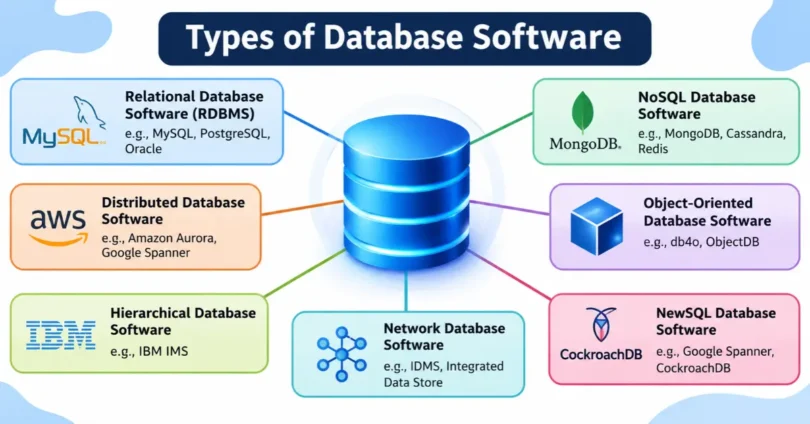
Types of Database Software, help businesses and individuals store, manage, organize and access data efficiently. Different database software offers unique features and functions to handle various data management needs. Understanding these types can help you choose the right solution for better data storage, security and performance.
Relational Databases (RDBMS)
Relational Databases (RDBMS) store data in tables made up of rows and columns.
How Relational Databases Work
RDBMS organizes data into structured tables. Each table contains rows and columns, while primary.
Key Features
- Stores data in tables.
- Uses rows and columns.
- Supports SQL queries.
Pros of Relational Databases
- Easy to organize structured data.
- Maintains data accuracy and consistency.
- Supports complex queries.
Cons of Relational Databases
- Can be difficult to scale horizontally.
- Requires a structured data model.
- May need complex database design.
Common Uses
- Banking and financial systems.
- E-commerce websites.
- Customer management systems.
Popular Examples
- MySQL
- PostgreSQL
- Oracle Database
When to Use Relational Databases
Use relational databases when you need structured data, strong data consistency.
Relational Databases (RDBMS) are a reliable solution for storing and managing structured data.
NoSQL Databases
NoSQL Databases store and manage unstructured, semi-structured and large amounts of data.
How NoSQL Databases Work
NoSQL databases store data in different formats, such as documents, key-value pairs, graphs and columns. Unlike relational databases, they do not always require fixed tables or schemas.
Key Features
- Supports flexible data structures.
- Handles large amounts of data.
- Offers high scalability.
Pros of NoSQL Databases
- Easy to scale with growing data.
- Handles large datasets efficiently.
- Supports flexible data formats.
Cons of NoSQL Databases
- May have limited complex query support.
- Data consistency can vary by database.
- Requires different management skills.
Common Uses
- Social media platforms.
- Real-time applications.
- E-commerce websites.
Popular Examples
- MongoDB
- Apache Cassandra
- Redis
When to Use NoSQL Databases
Use NoSQL databases when you need flexible data storage, high scalability, fast performance and the ability to manage large amounts of unstructured or changing data.
NoSQL Databases provide flexible and scalable solutions for modern data management.
Hierarchical Databases
Hierarchical Databases organize data in a tree-like structure with parent-child relationships.
How Hierarchical Databases Work
Hierarchical databases store data in a top-down structure. Each record is connected through parent-child relationships. A parent can have multiple children, but each child usually has only one parent.
Key Features
- Uses a tree-like structure.
- Organizes data into parent-child relationships.
- Supports one-to-many relationships.
Pros of Hierarchical Databases
- Easy to understand and organize.
- Provides fast data retrieval.
- Maintains clear data relationships.
Cons of Hierarchical Databases
- Difficult to manage complex relationships.
- Changes in structure can be challenging.
- Supports limited relationship types.
Common Uses
- Banking systems.
- Telecommunication systems.
- Employee management.
Popular Examples
- IBM Information Management System (IMS).
- Windows Registry.
When to Use Hierarchical Databases
Use hierarchical databases when your data follows a clear parent-child structure and requires fast access through predefined relationships.
Hierarchical Databases provide a simple and organized way to manage data through tree-like structures.
Network Databases
Network Databases organize data using a flexible structure that allows records to have multiple relationships.
How Network Databases Work
Network databases store data as records connected through links or pointers. Each record can connect to multiple parent and child records.
Key Features
- Supports many-to-many relationships.
- Uses interconnected data records.
- Provides flexible data connections.
Pros of Network Databases
- Handles complex relationships efficiently.
- Supports multiple data connections.
- Provides fast data access.
Cons of Network Databases
- Difficult to design and maintain.
- Requires technical knowledge.
- Database structures can become complex.
Common Uses
- Banking systems.
- Telecommunications.
- Manufacturing systems.
Popular Examples
- Integrated Data Store (IDS).
- IDMS (Integrated Database Management System).
When to Use Network Databases
Use network databases when your application requires complex relationships, multiple connections between records and efficient access to interconnected data.
Network Databases provide an effective way to manage complex data relationships through interconnected records.
Object-Oriented Databases
Object-Oriented Databases store data in the form of objects, similar to object-oriented programming languages.
How Object-Oriented Databases Work
Object-oriented databases store information as objects containing attributes and methods. Each object represents a real-world entity and can include complex data types.
Key Features
- Stores data as objects.
- Supports classes and inheritance.
- Combines data and methods.
Pros of Object-Oriented Databases
- Handles complex data efficiently.
- Supports reusable objects.
- Reduces the need for data conversion.
Cons of Object-Oriented Databases
- Can be difficult to learn.
- Requires specialized knowledge.
- Has limited standardization compared to SQL databases.
Common Uses
- Computer-aided design (CAD).
- Multimedia applications.
- Scientific research systems.
Popular Examples
- ObjectDB
- db4o
- GemStone/S
When to Use Object-Oriented Databases
Use object-oriented databases when your application handles complex objects, requires advanced data relationships, and works closely with object-oriented programming languages.
Object-Oriented Databases provide an effective way to store and manage complex data using objects.
Graph Databases
Graph Databases store and manage data using nodes, edges and properties.
How Graph Databases Work
Graph databases represent data as nodes and relationships as edges. Nodes store information about people, places or objects, while edges show how they are connected. This structure helps users quickly find relationships between different data points.
Key Features
- Stores data using nodes and edges.
- Focuses on data relationships.
- Supports flexible data structures.
Pros of Graph Databases
- Easily manages complex relationships.
- Provides fast relationship searches.
- Offers flexible data structures.
Cons of Graph Databases
- Can be difficult to learn.
- Requires specialized knowledge.
- May need complex database management.
Common Uses
- Social media platforms.
- Recommendation systems.
- Fraud detection.
Popular Examples
- Neo4j
- Amazon Neptune
- ArangoDB
When to Use Graph Databases
Use graph databases when your application needs to manage highly connected data, explore complex relationships and perform fast relationship-based searches.
Graph Databases provide an effective way to store and analyze connected data.
Common FAQs About Types of Database Software
Here are some faqs of Types of Database Software:
What factors should be considered when selecting database software?
Consider data size, security requirements, performance, budget, scalability and compatibility with your existing systems.
Is database software suitable for small businesses?
Yes, database software helps small businesses manage customer information, track sales, organize inventory and maintain business records.
What is the difference between open-source and commercial database software?
Open-source database software allows users to access and modify its source code, while commercial software usually requires a paid license and may include professional support.
Can database software handle large amounts of data?
Yes, many database systems are designed to process large datasets through optimized storage, indexing and distributed computing.
How does database software protect sensitive information?
It uses security measures such as encryption, user authentication, access permissions and regular backups to protect stored information.
What is database scalability?
Database scalability refers to the ability of a database system to handle increasing amounts of data, users and workloads without major performance issues.
Can different database software systems work together?
Yes, different database systems can exchange information through APIs, database connectors, data integration tools and migration utilities.
How often should database software be updated?
Database software should be updated regularly to fix security vulnerabilities, improve performance, maintain compatibility and access new features.
Conclusion
Types of Database Software play an important role in storing, organizing and managing digital information. Each database solution offers different capabilities for handling data, supporting business operations and improving system performance. Choosing the right database software depends on your data requirements, budget, security needs and future growth.