Utility software is an important part of a computer system because it helps keep the computer safe, organized, and working properly. The Utility Software Definition Computer, Users should know is simple: utility software is a type of program that helps maintain, protect, and improve a computer’s performance. It includes tools such as antivirus software, disk cleanup tools, backup programs, and file compression tools. These programs help users manage files, remove unwanted data, protect personal information, and solve common computer problems. You will learn about the types, uses, examples, and benefits of utility software in simple English.
What Is Utility Software in a Computer?
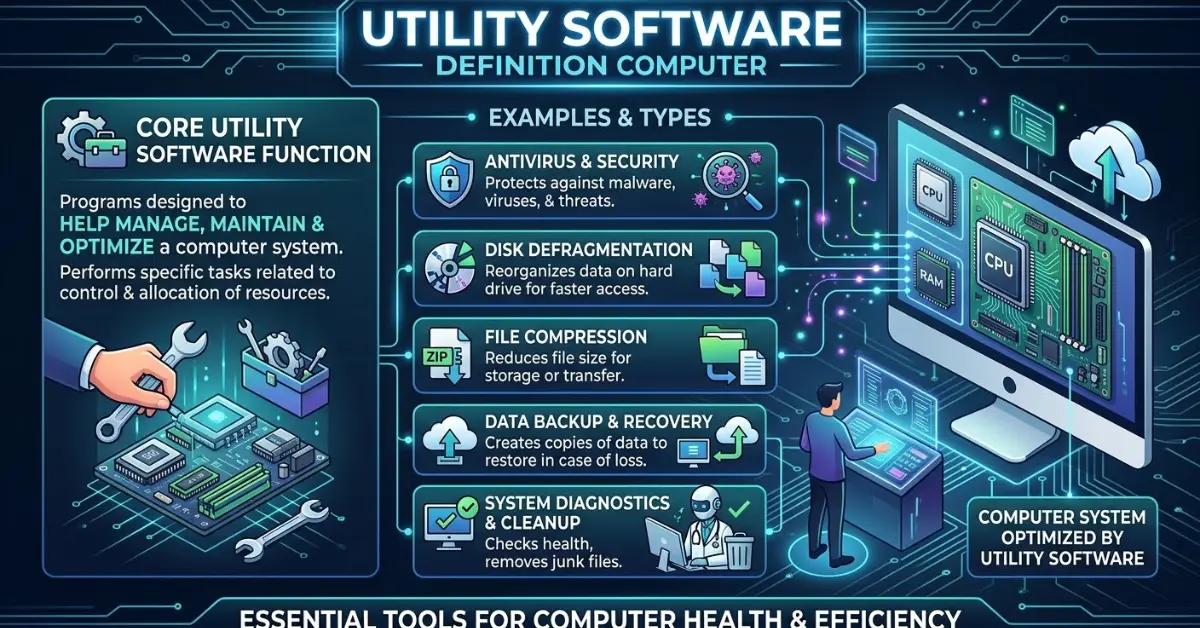
Utility softwareis a type of computer program that helps keep a computer safe, clean, and working properly. It helps users manage files, protect their data, remove unwanted files, and find computer problems. For example, antivirus software protects a computer from viruses, while disk cleanup tools help remove unnecessary files and free up storage space. Most computers have built-in utility tools, and users can also install trusted programs when they need extra features. Utility software works with the computer’s operating system to make everyday tasks easier and help maintain the system.
Why Is Utility Software Important?
Utility software is important because it helps keep a computer safe, organized, and working properly. It makes computer maintenance easier and helps users solve common problems. Here are the main reasons why utility software is useful:
- Protects Against Threats: Antivirus and security tools help protect computers from viruses, malware, and other online dangers.
- Frees Up Storage Space: Cleanup tools remove unnecessary files and help users make room for new data.
- Improves Computer Maintenance: Utility programs help users check system health and identify possible problems.
- Keeps Files Organized: File management tools make it easier to find, move, copy, and organize documents.
- Prevents Data Loss: Backup utilities create copies of important files so users can recover them when needed.
- Protects Private Information: Encryption tools help keep personal and sensitive data safe from unauthorized access.
- Saves Time and Effort: Automated maintenance tasks reduce the need to perform every task manually.
- Helps Solve Technical Problems: Diagnostic tools can identify certain errors and guide users toward possible solutions.
Utility software is important because it helps users maintain their computers, protect valuable data, and manage everyday tasks more easily.
How Does Utility Software Work?
Utility software works with the computer’s operating system to maintain, protect, and improve the system. It performs different tasks to help the computer work properly.
- Scans the Computer: Antivirus tools check files and programs for viruses and other harmful threats.
- Removes Unwanted Files: Disk cleanup tools delete unnecessary files to free up storage space.
- Manages Files: File management tools help users organize, move, copy, and delete files.
- Protects Data: Backup utilities save copies of important files so users can recover them if data is lost.
- Compresses Files: File compression tools reduce file sizes, making files easier to store and share.
- Checks System Health: Diagnostic tools check computer components and report possible problems.
- Improves Performance: Some utilities help manage storage and system resources to keep the computer running efficiently.
Utility software performs specific maintenance and protection tasks to help a computer stay safe, organized, and reliable.
What Are the Main Types of Utility Software?
Utility software comes in different types, and each type performs a specific task to keep a computer safe, organized, and working properly. The main types of utility software include:
- Antivirus Software
- Disk Cleanup Tools
- Backup Software
- File Compression Tools
- File Management Utilities
- Disk Optimization Tools
- Firewall Utilities
- Diagnostic Tools
- Encryption Software
Each type of utility software has a different purpose, but all help users maintain, protect, or manage their computers more effectively.
Common Examples of Utility Software
There are many utility software programs that help users protect their computers, manage files, and solve common problems. Here are some common examples of utility software and their uses.
- Windows Security: Helps protect Windows computers from viruses, malware, and other security threats.
- Disk Cleanup: Removes unnecessary files to free up storage space on supported Windows versions.
- Task Manager: Shows running apps and processes and helps users monitor computer performance.
- File Explorer: Helps users find, organize, copy, move, and delete files and folders.
- 7-Zip: Compresses files and extracts compressed folders to save space and make sharing easier.
- Windows Backup: Helps users back up selected files and settings, depending on the Windows version and backup configuration.
- Windows Firewall: Helps protect a computer by controlling incoming and outgoing network connections.
- CHKDSK: Checks a storage drive for file system errors and can help repair certain problems.
- BitLocker: Encrypts supported Windows drives to help protect stored data from unauthorized access.
- Defragment and Optimize Drives: Helps optimize storage drives according to their type, including defragmenting traditional hard drives and retrimming SSDs.
These examples show how utility software supports different computer tasks, from security and file management to storage maintenance and data protection.
Advantages and Disadvantages of Utility Software
Utility software helps users maintain, protect, and manage their computers. The following table explains its main advantages and disadvantages.
| Advantages | disadvantages |
| Helps protect computers from viruses and malware. | Some programs use memory and processing power. |
| Removes unnecessary files to free up storage space. | Some advanced tools require payment. |
| Creates backups to help prevent data loss. | Untrusted utilities may contain malware. |
| Helps find and fix certain computer problems. | Incorrect use may delete important files. |
| Makes computer maintenance easier and faster. | Some programs need regular updates. |
| Protects sensitive data through encryption. | Some tools may be difficult for beginners to use. |
Utility software makes computer maintenance easier, but users should choose trusted tools and use them carefully.
Common FAQs About Utility Software Definition Computer
Here are Some Faqs of Utility Software Definition Computer:
Is Utility Software Required to Run a Computer?
No, a computer can run without many extra utility programs, but built-in security and maintenance tools can help keep it safe and working properly.
What Is the Difference Between Automatic and Manual Utility Tools?
Automatic utility tools perform tasks on a schedule or in the background, while manual tools require users to start the task themselves.
Can Utility Software Help Recover Deleted Files?
Yes, some data recovery utilities can restore deleted files, but recovery is not always possible, especially if the data has been overwritten.
Does Utility Software Work on Every Operating System?
No, some utility programs are designed for specific operating systems, such as Windows, macOS, or Linux.
Can Two Utility Programs Conflict With Each Other?
Yes, some utilities, especially those that perform similar security or system tasks, may interfere with each other or use extra system resources.
How Often Should Utility Software Be Updated?
Utility software should be updated whenever trusted developers release important security updates, bug fixes, or useful improvements.
Can Utility Software Work Without an Internet Connection?
Yes, many utilities work offline, including file compression, disk checking, and local file management tools, although some features may require internet access.
How Can Students Learn to Use Utility Software?
Students can begin with built in computer tools, follow beginner tutorials, and practice simple tasks such as organizing folders, checking storage, and creating backups.
Conclusion
Utility software plays an important role in keeping computers safe, organized, and working properly. It helps users perform everyday tasks, manage computer resources, and solve common technical problems. Understanding the utility software definition computer users need makes it easier to choose the right tools for different needs. Whether you are a student or a regular computer user, learning about utility software can help you take better care of your computer. Always choose trusted programs and use them carefully to protect your files and personal information.