Understanding the Software Definition in English, Is easy when explained in simple words. Software is a set of instructions that tells a computer or mobile device what to do. It helps us write documents, browse the internet, play games, watch videos, and complete many daily tasks. Examples of software include Windows, Google Chrome, and Microsoft Word. Understanding the software definition in English is easy when explained in simple words. Software is a set of instructions that tells a computer or mobile device what to do. It helps us write documents, browse the internet, play games, watch videos, and complete many daily tasks
What Is Software in English?
Software is a collection of computer programs that help users perform different tasks. It does not have a physical shape that we can touch, unlike a keyboard or monitor. Software contains instructions that tell a device how to handle information and respond to user commands. For example, when you type a letter, save a file, or edit a picture, software helps complete that action. Software can also be updated to add new features, improve performance, and fix problems.
What Are the Main Types of Software?
There are four main types of software:
- System Software
- Application Software
- Programming Software
- Utility Software
Together, these four types of software make computers more useful, efficient, and easy to use.
System Software
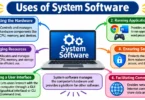
System software is a type of software that manages computer hardware and helps the computer work properly. It creates a link between the computer’s hardware and the applications people use. Without system software, it would be difficult for users to control a computer and run other programs.
How Does System Software Work?
System software controls important computer operations and helps different parts of the computer work together. Its main tasks include:
- Managing Hardware: It controls devices such as the keyboard, mouse, printer, and storage drives.
- Running Applications: It provides the environment needed to open and use other software.
- Managing Memory: It helps the computer use its memory to run programs.
- Controlling Files: It helps organize, save, open, and manage files.
- Providing Security: Some system software helps protect the computer and manage user access.
Examples of System Software
- Windows: An operating system used on many personal computers.
- Linux: An operating system used on computers, servers, and other devices.
- macOS: An operating system designed for Apple Mac computers.
- Device Drivers: Programs that help the operating system communicate with hardware devices.
- BIOS or UEFI Firmware: Software that helps initialize hardware and start the computer.
Why Is System Software Important?
System software is important because it manages the computer’s basic functions and allows application programs to run. It also helps control hardware, manage resources, and provide a way for users to interact with their devices.
System software works behind the scenes to keep a computer running and help other programs work correctly.
Application Software
Application software is a type of software that helps users perform specific tasks on a computer, laptop, tablet, or mobile phone. It is designed to make everyday activities easier, such as writing documents, browsing the internet, editing photos, watching videos, and communicating with others.
How Does Application Software Work?
Application software follows instructions to help users complete different tasks. Users interact with it through menus, buttons, icons, and other features.
- Creating Documents: It helps users write, edit, and save documents.
- Browsing the Internet: It allows users to visit websites and search for information.
- Editing Images: It helps users change pictures, add effects, and create designs.
- Communication: It allows people to send messages, make calls, and attend online meetings.
- Entertainment: It helps users watch videos, listen to music, and play games.
Examples of Application Software
- Microsoft Word: Used to write and edit documents.
- Google Chrome: Used to browse websites.
- Microsoft Excel: Used to organize data and perform calculations.
- Adobe Photoshop: Used to edit images and create designs.
- VLC Media Player: Used to play video and audio files.
- WhatsApp: Used to send messages and make calls.
Why Is Application Software Important?
Application software saves time, improves productivity, and makes many daily tasks easier. Students can use it for learning, teachers can prepare lessons, and businesses can manage their work more efficiently.
Application software helps users perform specific tasks according to their needs, making computers and mobile devices more useful in everyday life.
Programming Software
Programming software is a type of software that helps developers create, test, and fix computer programs. It provides tools that allow programmers to write instructions using programming languages such as Python, Java, and C++. These tools make it easier to build websites, mobile apps, games, and other computer programs
How Does Programming Software Work?
Programming software provides tools that help developers throughout the process of creating programs.
- Writing Code: It allows programmers to write instructions for computers.
- Finding Errors: It helps developers identify and fix mistakes in their code.
- Testing Programs: It allows programmers to check whether their code works correctly.
- Running Code: Some tools can run programs so developers can see the results.
- Building Applications: It helps developers create software for computers, websites, and mobile devices.
Examples of Programming Software
- Visual Studio Code: Used to write and edit code.
- PyCharm: Designed for Python development.
- Eclipse: Used to develop applications, especially in Java.
- GCC: A compiler used to translate code into a form computers can execute.
- Android Studio: Used to develop Android applications.
Why Is Programming Software Important?
Programming software makes it easier for developers to create reliable applications, solve coding problems, and test their work. It also helps save time and supports the development of new technologies.
Programming software provides the tools developers need to write code and turn their ideas into working programs.
Utility Software
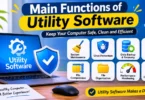
Utility software is a type of software that helps maintain, protect, and improve a computer’s performance. It performs special tasks that keep a computer organized, secure, and working properly. Utility software can help remove unwanted files, scan for viruses, back up important data, and manage storage space.
How Does Utility Software Work?
Utility software checks different parts of a computer and performs tasks to keep the system in good condition.
- Virus Protection: It scans for harmful programs and helps protect the computer from security threats.
- File Cleanup: It removes unnecessary files to free up storage space.
- Data Backup: It creates copies of important files to help prevent data loss.
- File Compression: It reduces file sizes to make storage and sharing easier.
- Disk Management: It helps check and manage storage drives.
Examples of Utility Software
- Microsoft Defender: Helps protect computers against viruses and other threats.
- Windows Disk Cleanup: Removes certain unnecessary files.
- 7-Zip: Compresses and extracts files.
- Windows Backup: Helps create backups of important files and system data.
- CHKDSK: Checks a Windows storage drive for file system errors.
Why Is Utility Software Important?
Utility software helps improve computer maintenance, protect important information, and manage storage space. It can also help users find problems before they cause bigger issues.
Utility software helps keep a computer secure, organized, and running smoothly.
Common FAQs About Software Definition in English
Here are Some Faqs of Software Definition in English:
What Is the Difference Between Free Software and Paid Software?
Free software can be used without paying a fee, while paid software requires users to purchase it or pay for a subscription.
Can Software Become Outdated?
Yes, software can become outdated when it no longer receives updates or cannot support newer devices and technologies.
What Is Open Source Software?
Open-source software allows users to view its source code, and its license permits them to modify or share it under specific conditions.
What Is Cloud-Based Software?
Cloud based software runs partly or mainly on internet-connected servers, allowing users to access its features through a web browser or app
Why Does Software Need Updates?
Software updates can fix errors, improve security, add new features, and make programs work better with newer devices.
What Is a Software License?
A software license is a set of rules that explains how users are allowed to install, use, copy, or modify a program.
What Is Portable Software?
Portable software can run on a compatible computer without a traditional installation, often from a USB drive or a local folder.
What Should You Check Before Installing Software?
Check whether the software comes from a trusted source, supports your device, meets your needs, and has suitable privacy and security terms.
Conclusion
Understanding the software definition in English helps us learn how computers and digital devices perform different tasks. Software provides instructions that help devices work, supports useful applications, and makes everyday activities easier. From learning and communication to business and entertainment, software plays an important role in modern life. By understanding its types, uses, and basic functions, students can build a strong foundation in computer knowledge and learn how technology helps people every day.